
,

The AI productivity space is evolving at lightning speed, with new tools and platforms emerging to help organizations work smarter. Staying ahead means understanding not just what’s available, but how these solutions differ—and where Microsoft 365 Copilot stands out.
The Unified Advantage
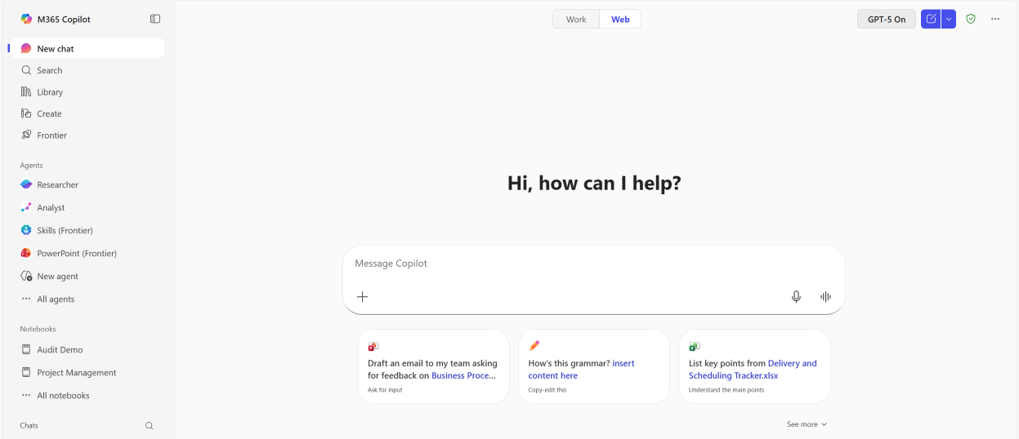
Many organizations today find themselves juggling multiple AI tools for chat, search, content creation, and workflow automation. This patchwork approach often leads to fragmented workflows, higher costs, and increased complexity in security and governance. Microsoft 365 Copilot takes a different path by bringing together chat, search, agents, notebooks, and creative capabilities in a unified experience. This integration reduces context switching and keeps work grounded in familiar productivity tools.
Copilot vs. Other AI Tools: Key Differences
1. Chat & Collaboration
- Copilot: Delivers contextual chat grounded in organizational and web data, with persistent memory and tightly integrated experiences across Microsoft 365 apps. Conversations follow users across their work, adapting to role-based context.
- ChatGPT: While powerful, relies on external connectors that are often read-only. This results in inconsistent responses and adds security considerations. Integration with productivity apps remains limited and frequently requires manual handoffs.
- Google Gemini: Provides chat within Workspace apps but lacks consistent cross-app memory and orchestration. Switching between apps disrupts continuity and interrupts context.
- Glean & Canva: Concentrate on enterprise search and design collaboration respectively, with more limited chat depth and productivity integration.
2. Search & Data Integration
- Copilot: Uses semantic search across Microsoft 365 and supported third-party apps, drawing insights from a broad connector ecosystem. Admins curate authoritative answers to guide users toward trusted information.
- Glean: Known for federated enterprise search, though performance is sometimes inconsistent and setup is often complex. Native collaboration and memory retention remain limited.
- Gemini: Focuses search within Google Workspace environments. Governance considerations arise when Microsoft 365 data is introduced into Google Cloud.
- ChatGPT & Canva: Offer basic retrieval and discovery features without deep organizational context.
3. Agents & Automation
- Copilot: Includes an agent store with prebuilt and custom agents that support event-driven workflows and low-code creation. Analytics and lifecycle management are integrated into the platform.
- ChatGPT: Enables custom GPTs and agents, but centralized governance and lifecycle controls remain more limited.
- Gemini & Glean: Provide agent-building tools with fewer options tailored for business operations.
- Canva: Emphasizes design assistants rather than broad business automation.
4. Notebooks & Collaboration Spaces
- Copilot: Centralizes content and collaboration through AI-powered notebooks with real-time updates, persistent chat, and direct integration into productivity apps.
- NotebookLM (Gemini): Operates on manually uploaded files without live connections to enterprise systems.
- Glean & Canva: Support document collaboration, though integration depth and intelligent suggestions vary.
5. Content Creation
- Copilot: Generates images, videos, briefs, and branded templates directly within Microsoft 365 apps, informed by organizational content and brand assets.
- Canva: Excels at visual design in a standalone environment with AI features focused on layout and imagery.
- Gemini & ChatGPT: Offer creative generation features that typically require separate tools or add-ons for full workflows.
Security, Governance, and Total Cost of Ownership
A primary differentiator for Copilot is its enterprise-grade approach to security and compliance. Data remains within the Microsoft 365 tenant, supporting privacy requirements and helping organizations meet regulatory needs through unified identity, access, and audit controls. Other AI tools often require moving data across cloud environments, which introduces additional operational and governance considerations.
Copilot pricing ($30 per user per month for Enterprise SKUs and $21 per user per month for Business SKUs) covers core capabilities in a single subscription. By contrast, comparable functionality across multiple AI tools typically requires stacked licenses, usage tiers, or feature-based add-ons.
Key Takeaways
For customers evaluating AI productivity tools, Microsoft 365 Copilot delivers value through:
- Simplified workflows: A unified experience across apps reduces tool sprawl and streamline daily work.
- Enterprise security and compliance: Data stays within the Microsoft 365 tenant, supported by established governance controls.
- Operational scalability: Copilot Studio and the Agent Store support tailored solutions aligned to business needs.
- Cost efficiency: Consolidating capabilities into one platform lowers complexity and supports clearer ROI measurement.
Conclusion
Microsoft 365 Copilot offers organizations a practical path to improved productivity by unifying AI capabilities inside the tools employees already use. This approach reduces operational friction, supports governance requirements, and enables innovation without adding unnecessary complexity.
Want to see how Copilot and ChatGPT handle the same prompts? Check out Microsoft’s 365 Copilot vs. ChatGPT Enterprise comparison: Not all AI is built for work. Copilot is the clear choice when it comes to Teams meetings, SharePoint pages, org structures, sensitivity labels and encrypted files.